

In the past, a lost cell phone in a stranger’s hands might have meant no more than access to bunch of phone numbers. With the iPhone, it could mean access to your email, calendar, contact addresses, personal website info, and much more. But the iPhone’s got your back. It’s called Passcode Lock, and you can turn it on in the settings menu of the iPhone.
What is Passcode Lock?
Password Lock locks your phone down, allowing nothing but an emergency call until the user enters a four-digit password to unlock it again.
How do I turn on Passcode Lock?
You turn it on in the Settings menu on the iPhone. Go to the General tab, and you’ll see a Passcode Lock tab toward the bottom of the screen. Select it.

You will be asked to enter a four-digit passcode. Make it one you’ll remember!

Next, a settings menu for Passcode Lock will appear. You can set how quickly your iPhone locks with Passcode Lock.

What if I forget my password?
If you forget the password, you’ll have to go through a restore process by connecting it to iTunes. See bottom of this post for instructions on how to do this.
Can I password protect specific iPhone apps, like email? I don’t want to lock down the whole phone.
Unfortunately, you can’t password protect individual applications like email. This would make a great feature though, so hopefully Apple will add it in the future.
What’s up with the new “Erase Data” feature?
The iPhone 2.1 software has added a new security feature that can erase all the iPhone’s data when there are ten failed password attempts. You have to turn this feature on, as it’s set to off as a default. As long as you backup your iPhone when you sync it to iTunes (done by default), you should have no worries about the loss of data.

The “erase data” feature can be turned on in the iPhone settings by tapping General, then Passcode Lock, moving the Erase Data tab to On.
How to restore your iPhone if you forget your password:
If you forget your passcode, you’ll need to restore your iPhone to factory settings. You’ll need to put the iPhone into Recovery Mode by following the instructions below.
- Turn off your iPhone by pressing the Sleep button at the top for 5 seconds, then “Slide to Power Off”
- Launch iTunes on your computer
- Plug in your iPhone to your computer
- Press and hold down both the sleep button and the home button
- The Apple logo will appear for about 5 seconds, the disappear. When it disappears, keep holding the Home button but release the Sleep button.
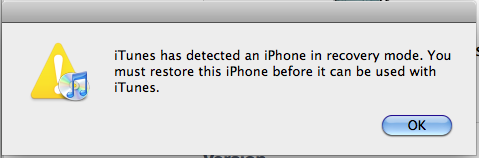
- Keep holding the home button until you see the restore screen pop up in iTunes:
- Click OK and restore it to factory settings.
- Once it’s done restoring to factory settings and is activated, iTunes will prompt you to restore from your previous backup (from the last time you synched the iPhone).
To browse through more of Art of the iPhone‘s tips, click here.









I try the restore iphone but cant find it on itunes so im stuck, here what the error says when opening itunes on my pc “iTunes could not connect to the iPhone “LoOnY’s i-phone” because it is locked with a passcode. You must enter your passcode on the iphone before it can be used with itunes” Some how itunes does have the restore option or cant read my iphone its says “iphone is disabled connect to itunes” on my iphone screen I try reinstall uninstall u name it nada plz help ty for your time
my iphone is disabled. how can i unlock it
thanks< itunes has a lock from previous owner what do i do_ so i can upload songs since i am the new owner?
How do I restore my iphone when it is saying “Itunes could not connect to the iphone because it is locked with a passcode. you must enter your passcode on the iphone before it can be used with itunes” and i tried the method that state to 1. hold the home & power button, 2. hold power then simultaneously the home button. please help my phone is my world, now im stuck using my old blackberry.
My iPhone is doing the same thing. When I plug in it my computer iTunes sends me a message saying “Itunes could not connect to the iphone because it is locked with a passcode. you must enter your passcode on the iphone before it can be used with itunes”. As simple as putting in a passcode sounds, it wont give me the option on my iPhone. My iPhone then tells me to plug in to iTunes which yet again gives me that stupid message. And I’m the only owner of this phone and this is the computer at which it was activated on.
i forgot my password but i have 10 failed attempts and my comp. wont even reconize that my phone is pluged in
I have now recovered my iphone more than once but after the restore I get the message indicating that there is no SIM or the SIM is PW protected and I must tap and type in the passcode. There is no way for me to enter the passcode. My phone is stuck on the ITunes connected screen with only the option to make an emergency call. I too hate the iPhone. Any suggestions are apprecaited.
I’m sorry KCH, but you’ll have to be more specific with your problem.
What are the exact messages that pop up?
If your SIM card is locked, you can unlock it by logging into your AT&T Wireless account (wireless.att.com), clicking on “Phone/Device”, and then selecting “Unblock SIM card.” You will get a 8-digit PUK code. Enter it into the iPhone to unlock both your SIM card and to reset the SIM locking code.
18.kch wrote:
I have now recovered my iphone more than once but after the restore I get the message indicating that there is no SIM or the SIM is PW protected and I must tap and type in the passcode. There is no way for me to enter the passcode. My phone is stuck on the ITunes connected screen with only the option to make an emergency call. I too hate the iPhone. Any suggestions are apprecaited
I’m having a real problem. I have a passcode on my iPhone, which has been disabled for weeks. What had happened was I upgraded my phone before I had iTunes 8.2, and my locked itself up. Now that I HAVE the right iTunes, it recongnizes my phone when I plug it in, but it says I can’t access it because of the passcode lock. I need help! I’ve tried EVERYTHING! Please e-mail me if you can help!! splinterface@ymail.com
Thank you so much this realy helped me out for another problem i was having i couldnt find a way to connect my iPhone to itunes on my windows pc it kept saying to type in passcode but it was in emergency mode but it would connect to ,y mac but only problem with my macbook was i didnt have internet connection to it at the time.But this really helped me get around the passcode lock.
i just got my iphone yesterday and i’m trying to download apps. It says i need a password from itunes. when i got on itunes i don’t know where to go or what to do to get my password. can someone please help?
If you forgot your iTunes password, there should be a little “Forgot Password” button when you try to log in to iTunes. (Look to the top right corner of iTunes to log in.)
I don’t know where else to turn, I have called&taken my iphone 3g to 2 diff. stores.searched the web, called tech support, to no avail! My phone has locked up, I guess? It’s locked in the emergency call, only screen! Shows no service, and I do have service and my sim card is working. Another major problem’s that my phone doesn’t recognize it’s being plugged into the wall to charge or computer to itunes for me to do anything! My warrenty was up 2 days prior to this problem that happened last week. It’s useless and I loved my phone. I reaaly don’t know what to do with it!?
I am having the exact same problem, I’m wondering if anyone was able to help/tell you how to solve it? At this point, my phone’s useless and I’m about ready to take it apart and see if I can fix it because what do I have to loose?LOL! Please let me know if there’s anything that can be done, I miss my phone. Sonya
it worked for me just follow the instructions and it’ll work
Dangggg so easy it worked!!!! Thx!!!
If anyone is interested in signing the petition so that Apple enables the feature to just lock email do it here. Feel free to forward where appropriate.
http://www.petitiononline.com/iphone01/petition.html
Thanks.
Great tips to reset my iphone. Thank you very much…
It worked!! Thanks heaps
My iPhone 3GS was stolen from me, I had protected it with a passcode (don’t remember if the erase data option was on or not).
Can the thief plug it into a pc/mac with or without iTunes and get access to the data (photos, messages and such)?
I, too, have a problem with the message ” iPhone is disabled, connect to iTunes ” on my iPhone, I know my passcode, however, I don’t have the pc that I originally set up my iTunes in…..please help….I tried the suggestions above about the recovery mode and it didn’t work….again, please help…thanks in advance
I also had the problem that my iphone was showing connect to itunes to restore,but that itunes was saying that it could not link to the iphone until the passcode had been input.
The fix offered here worked well for me.
Thanks very much.
Iphone went blank. Still hot battery. When sync w computer it says “Itunes could not connect to the iPhone “sara’s iPhone” because it is locked with a passcode on the iPhone before it can be used with iTunes.” Last time this happened there was not a passcode and it was restored on computer and it worked again. But now it’s asking for passcode and we can’t enter it due to blank screen. help?
If you backed it up recently, restore it.
You can unlock your iPhone with jailbreaking software. It all depends on what software version is on your iPhone. Google it.
probolem… my iphone 3g is stuck on the apple logo, i try to restore and upgrade and it continues to ask for apple logo. So there is no way for me to enter my passcode… it got stuck on the apple logo after i jailbroked it on 4.0… any help would be greatly appreciated! Thank you!!
I have forgotten my password on my iphone 3gs. I need some help to see if i can get it unlocked, But i dont want to loose all my #. Can some one plz help
so i followed the isntructions to restore it but instead of taking me to the restore option, the phone just turns on.
Sorry about that. I fixed the instructions and confirmed that they work. Good luck.
Thank you so much!!!!! You have saved me so much. Everyone, if you follow the instructions carefully it does work. I lost Everything but it’s ok my phone works again. My problem was that my iphone said it needed to be restored. so i hooked it up to itunes and got the message saying that it couldn’t connect due to a passcode lock. 10 hours later i found this post and am glad i did!!!!!! Thanx again
hello sir,….i am having iPhone 3GS,…i want to set passcode in it but i am not getting any field in setting for setting the passcode. Is there any to enable passcode for my iPhone.
cannot connect to wifi
cannot connect to i tunes
want to update my iphone to be abble to sent photos via mms
My iPhone 3GS was stolen from me, I had protected it with a passcode (don’t remember if the erase data option was on or not).
Can the thief plug it into a pc/mac with or without iTunes and get access to the data (photos, messages and such)?
Not without some hacking. If it’s any consolation, it’ll be easier for them to wipe the phone if they want to use it for themselves in the future. Also remember that Find My iPhone is a free feature now, in case you had that turned on.
trying to restore from backup, however my backup is pw protected and i dont remember the code i used. how do i restore it to the backup getting around using or reseting or taking the lock off??
my iPhone is disabled. i followed the instructions then i restored it again. it says… “The iPhone could not be restored. An unknown error occurred (20).”
plss help. pls tell me what to do with that error and so i can restore my iPhone. thanks :D
Hi how can I have my phone locked since it was stolen and I wasn’t able to recover it I want it to lock since the person who stole it doesn’t use my phone so they learn not to steal. Please give me ideas I have my serial number from my phone if there is something I can do to turn off that feature in itunes I will do it anything will help!!!!!